PST Archive Viewer › PST to MBOX on a Mac
How to convert a PST file to MBOX on a Mac
Last updated 28 November 2026 · Applies to version 1.1.1
To turn an Outlook .pst file into MBOX on a Mac, open the PST in an app that exports MBOX, select the emails you want and save them as one .mbox file. PST Archive Viewer does this offline, without Outlook or Windows, on the Personal plan ($29 once), and lists every exported email with a SHA-256 hash in a report.
Free to open and search · macOS 12 or later, Apple Silicon · No account
What the MBOX export contains
| Item | In PST Archive Viewer |
|---|---|
| Output | One .mbox file per export, named export_ plus the date and time |
| Which emails | Whatever you select: a folder with its subfolders, a search result, or emails you tick by hand |
| Each email | The Internet headers stored in the PST (Received, Message-ID, References), the text and HTML body, inline images and attachments |
| Report | export_report.csv: folder, date, sender, subject, status and SHA-256 of every email |
| Plan | Personal, $29 paid once. The free version does not export MBOX. |
| Not included | Contacts, calendar and tasks (export those as vCard and iCalendar, free); Outlook notes, flags, categories and read status; emails attached to another email as Outlook items |
Convert PST to MBOX, step by step
- Download PST Archive Viewer and drag it to Applications.
- Drag the
.pstonto the window. It is opened read-only, and the app indexes it once in the background. - Click a folder in the sidebar to list its emails and those of its subfolders, or run a search to narrow them down, for example to one sender or a date range.
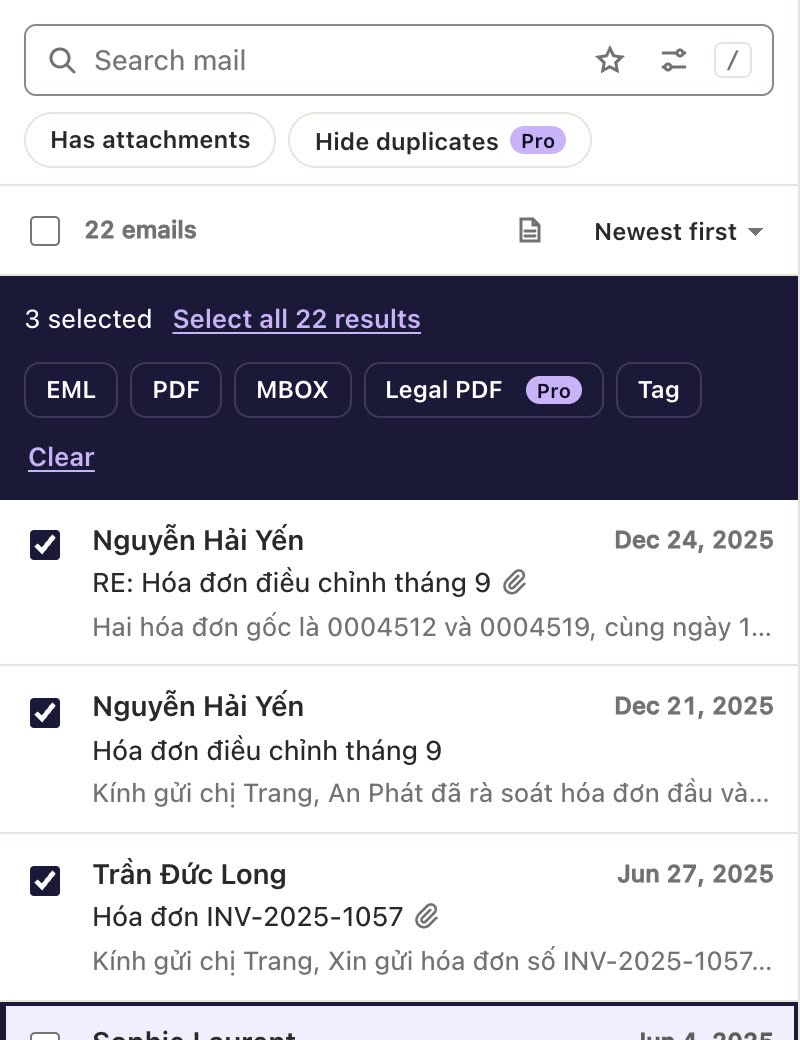
- Tick the checkbox above the list, then Select all N results if the link appears. One export covers up to 200,000 emails.
- Choose MBOX in the selection bar and pick a destination folder. The app creates a folder named
PST exportplus the date and time inside it and writes the files there. - When it finishes, open
export_report.csv. Every row should sayok; a failed email shows the error next to it.
One MBOX, or one per folder?
An MBOX file is a single list of messages: it has no folders inside. One export therefore becomes one mailbox when you import it into a mail app. If you want your Outlook folders to stay apart, export them one at a time, for example Inbox, Sent Items and each project folder.
Clicking a folder includes its subfolders. If you export a parent folder and then one of its subfolders on its own, the emails in that subfolder end up in both files.
What to do with the MBOX file
Apple Mail imports MBOX files with File › Import Mailboxes; the full steps are in how to import a PST into Apple Mail. Other mail apps that read MBOX have their own import steps, so follow their documentation. Keep the original PST and the report: together they show what was exported and from where.
When this app is not the right tool
- You need only a few emails. Export them as single EML files instead. The free version exports 20.
- You want to keep working in Outlook. Import the PST into Outlook for Mac instead; see the import steps.
- You expect the whole folder tree in one file. MBOX cannot hold one, and the app does not rebuild it for you.
- The PST is badly damaged. Repair it first with
scanpst.exeon a Windows PC. - Intel Mac. The app runs on Apple Silicon Macs only.
Questions
Can I convert PST to MBOX on a Mac for free?
Not in PST Archive Viewer. MBOX export is part of the Personal plan, $29 paid once. The free version opens and searches the whole PST and exports up to 20 single emails as EML or PDF.
Do I need Outlook or Windows to convert a PST to MBOX?
No. PST Archive Viewer reads the PST file directly on the Mac, offline, with no Outlook and no Microsoft account.
Does the MBOX file keep attachments?
Yes: file attachments and inline images are included, along with the Internet headers stored in the PST, such as Received and Message-ID. An email attached to another email as an Outlook item is not converted yet.
Will my Outlook folders become separate mailboxes?
Not automatically. One export makes one MBOX file, and an MBOX file has no folders inside. Export each folder separately if you want one mailbox per folder.
How do I check that nothing was lost?
Every export writes export_report.csv with one row per email: folder, date, sender, subject, status and a SHA-256 hash. Compare the number of rows marked ok with the message count your mail app shows after the import.