PST Archive Viewer › Open a PST file on Mac
How to open a PST file on a Mac, with or without Outlook
Last updated 24 November 2026 · Applies to version 1.1
macOS cannot open a .pst file by itself: Apple Mail, Finder and Quick Look do not read Outlook’s format. You have five options: a PST viewer app, importing into Outlook for Mac, moving the mail through an IMAP account, converting to MBOX for Apple Mail, or an online viewer. If you only need to read and search the mail, a viewer is the quickest, and PST Archive Viewer does that for free.
The five ways, side by side
| Method | Cost | Good for | Watch out for |
|---|---|---|---|
| 1. PST viewer app | PST Archive Viewer: free to read and search | Reading, searching and exporting without Outlook; large files | Apple Silicon Macs only |
| 2. Import into Outlook for Mac | Needs Outlook for Mac | Keeping the mail inside Outlook | Copies everything into Outlook; large imports are slow and can fail |
| 3. Through an IMAP account | Free, needs a Windows PC with Outlook | Small mailboxes you want in the cloud anyway | Uploads all mail to the provider; slow; quota limits |
| 4. Convert to MBOX, import into Apple Mail | Needs a converter | Moving the mail into Apple Mail for good | Check message counts after the import |
| 5. Online PST viewer | Often free for small files | A quick look at a small, non-sensitive file | You upload the whole mailbox; size caps |
1. Open it in a PST viewer
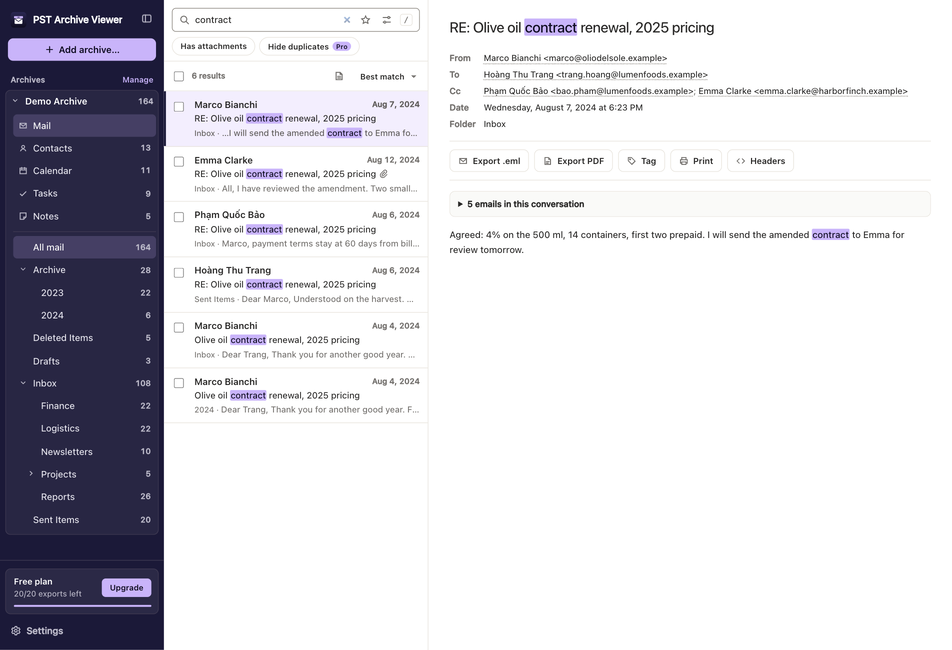
A viewer reads the PST where it is. Nothing is imported or converted, and the original file is not changed.
- Download PST Archive Viewer and drag it to Applications.
- Click Add PST file…, or drag the
.pstonto the window. - Browse the folder tree as it was in Outlook, or press
/and search. Indexing runs once in the background; you can read while it works.
Free to open and search · macOS 12 or later, Apple Silicon · No account
2. Import the PST into Outlook for Mac
Microsoft documents PST import for legacy Outlook for Mac: open the Import command (in the File menu, or on the Tools tab, depending on the version), choose Outlook for Windows archive file (.pst), select the file and click Import. The mail appears under On My Computer. See Microsoft’s instructions.
Two things to know. Microsoft’s support pages state that support for legacy Outlook for Mac ends in October 2026. And Microsoft’s roadmap lists PST import for Outlook for Mac as launched in June 2026, so check whether your version of the new Outlook shows an Import command.
Import copies every item into Outlook’s own database. That takes time and roughly doubles the disk space the mail uses, and people on Microsoft’s forums report crashes when importing large files. For a big archive, see how to open a large PST file.
3. Move the mail through an IMAP account
If you still have a Windows PC with Outlook, open the PST there, add an IMAP account such as Gmail or iCloud Mail, and drag the PST folders into it. Then add the same account on the Mac. This is free, but all the mail is uploaded to the provider, it is slow for large mailboxes, and the provider’s storage quota applies.
4. Convert to MBOX and import into Apple Mail
Apple Mail imports MBOX files: choose File › Import Mailboxes, then Files in mbox format. You need a tool that turns the PST into MBOX first. PST Archive Viewer exports a folder or a search result as MBOX on the Personal plan, with a report that lists every exported file, so you can compare counts after the import.
5. Use an online PST viewer
Online viewers open a PST in the browser after you upload it. They are fine for a small file with nothing private in it. For a work or personal mailbox, remember that the upload contains every email and attachment you ever kept, and that most online viewers stop at a few gigabytes.
Which one should you use?
- You need to find or read something: a viewer (method 1).
- You will keep working in Outlook on the Mac: import (method 2), if the file is not huge.
- You are moving to Apple Mail for good: MBOX (method 4).
- The mail is confidential: stay with methods that keep the file on your Mac (1, 2 or 4).
Questions
Can Apple Mail open a PST file?
No. Apple Mail does not read PST files. It can import MBOX files, so the PST has to be converted to MBOX first, or opened in a PST viewer instead.
Can I open a PST file on a Mac without Outlook?
Yes. A PST viewer such as PST Archive Viewer reads the file directly, with no Outlook and no Microsoft account. Reading and searching are free.
Is it safe to upload a PST file to an online viewer?
It depends on what is in it. A PST usually holds every email and attachment of a mailbox, so uploading it gives a copy of all of that to the service. For confidential mail, use a viewer that works offline on your Mac.
Does opening a PST in a viewer change the file?
Not in PST Archive Viewer. The PST is opened read-only; the search index is stored separately and can be deleted from the app.
What about OST files?
PST Archive Viewer opens OST files on a best-effort basis: many open like a PST, some newer ones do not. Try the free version on your file first.